Admin Charges
🛠️ Manage Admin Service Charges
✅ Purpose
The Manage Admin Service Charges sub-module allows system administrators to configure internal platform-level fees that apply to transactions based on:
- The sending country
- The payment method used by the customer
- (Optionally) the delivery method
💡 These fees are not visible to customers.
They are used internally by the platform to manage costs, maintain profitability, or apply back-office charges depending on the transaction type.
Examples include:
- Adding a platform fee for all card-funded transactions from a specific country.
- Applying a percentage charge to wallet transfers initiated in certain regions.
🎛️ Filtering Options
At the top of the module, dropdown filters help admins find existing charges quickly and efficiently.
Available Filters:
- Sending Country – Where the transaction originates
- Payment Method – E.g., Bank, Wallet, Card
- Delivery Method – Optional; how the funds are delivered
- Charges Type – Filter by
FlatorPercentage-based fees - Status – Show only
ActiveorInactiveentries - Action – Edit or Delete configured charges
🔎 Use these filters to locate, audit, or manage existing platform charges.
1. Click "Manage Admin Service Charges Add Admin Charges"

To create a new charge, click ➕ "Add new Admin Charge"
2.

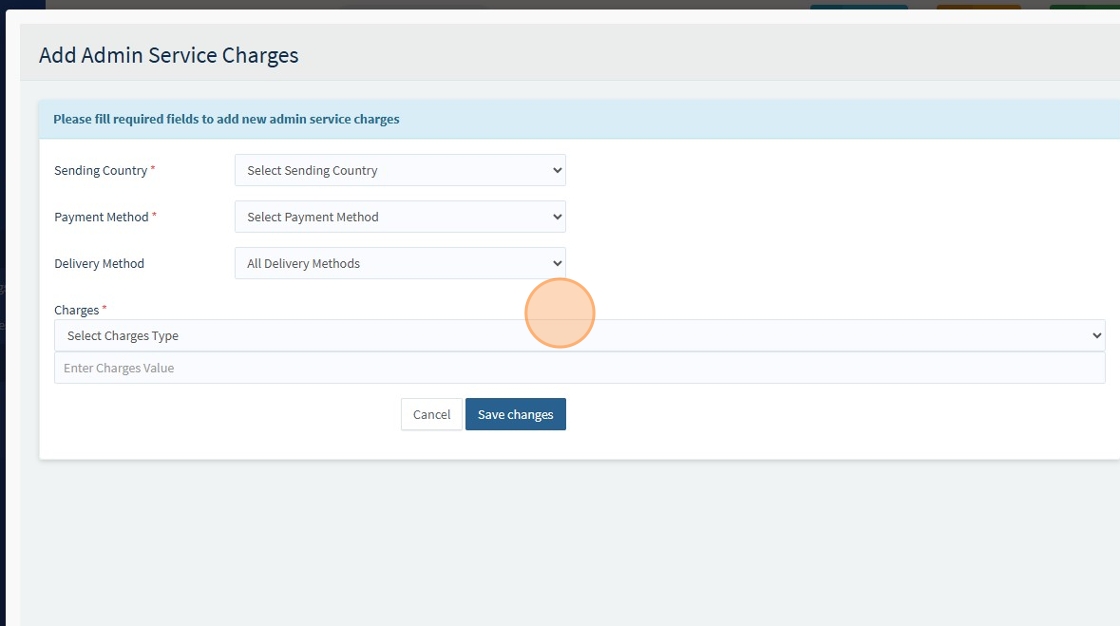
After clicking ➕ "Add new Admin Charge" button. A form will appear prompting you to fill in the details.
| Field | Description |
|---|---|
| Sending Country* | Required – Select the country the transaction originates from |
| Payment Method* | Required – Select how the user funds the transaction (e.g., Bank, Debit Card) |
| Delivery Method | Optional – Select how the money is delivered (e.g., Wallet, Bank) |
| Charges Type* | Required – Choose Flat (fixed value) or Percentage (based on transaction amount) |
| Charges Value* | Required – Enter the charge amount (e.g., 10.00 or 2.5%) |
📘 Fields marked with an asterisk
*are required.
✅ Click “Save changes” to save and activate the new admin charge
3.
📦 Bulk Actions
Admins can select multiple rows using checkboxes and perform bulk actions for efficiency:
- ✅ Activate selected charges
- 🔴 Deactivate selected charges
- 🗑️ Delete selected charges
Bulk actions save time when managing multiple entries at once. 4.

⚠️ Key Note
- These are internal platform fees, not visible to the end users.
- They help support internal accounting models or dynamic fee management.
- Delivery Method is optional for more flexible configuration.
- Use:
Flatfor fixed operational costs (e.g., processing fee of £10)Percentageto scale with transaction size (e.g., 2.5%)